By Imran Abul Kashem, Founder of Westend Photography
For most people who use LinkedIn to get hired, win work or represent a business, a professionally photographed headshot is the safer long-term choice. It shows what you actually look like, and you control the lighting, expression, clothing and consistency. An AI headshot can make sense when budget, location or timing rules out a shoot, but results vary and generated details may not match how you look in person.
That does not make every AI headshot bad or every studio photo good. The right choice depends on what the image is for, how closely the result resembles you, and how much authenticity and repeatability matter in your line of work.
A quick disclosure: we run a headshot studio in Werribee, so we have an obvious commercial interest in this question. That is why this comparison is based on LinkedIn’s published rules, current research and Australian privacy and copyright guidance, and why we are equally clear about the situations where AI headshots can make sense.
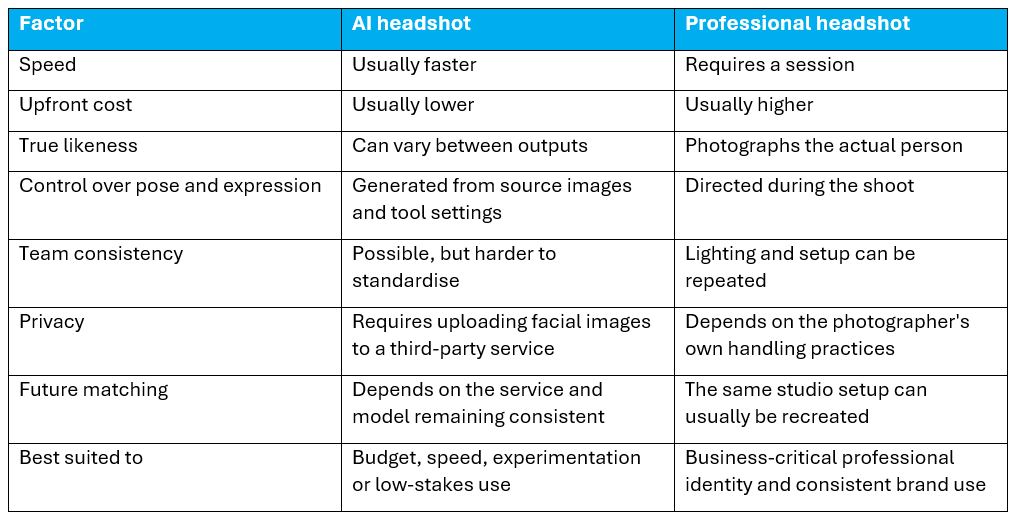
AI headshots vs professional headshots for LinkedIn at a glance
What LinkedIn actually requires from your profile photo
LinkedIn’s profile photo guidance is fairly simple. It says your photo must reflect your likeness, and it allows illustrations, caricatures and other artistic renderings of yourself. It may remove images that do not comply, including company logos, landscapes, animals, words, childhood photos and other people’s likenesses such as stock imagery or celebrities.
LinkedIn does not specifically address AI headshots in that guidance. Based on the wording, an AI-generated image that accurately reflects your likeness would appear consistent with the profile-photo rule, but LinkedIn does not explicitly confirm that interpretation.
So the practical question is not simply ‘AI or camera?’. It is this:
If someone meets you after seeing your LinkedIn profile, will they recognise you?
That is the most useful test to keep in mind throughout this comparison.
What makes a good LinkedIn headshot, however you make it
Before comparing methods, it helps to agree on the target. A strong LinkedIn headshot should be current, recognisable and easy to read at a small profile-photo size.
- A current likeness. It should look like you now, not several years and a different appearance ago.
- Your face filling enough of the frame. LinkedIn displays profile photos small and in a circular crop.
- An expression that fits your professional context. A warm, open expression works well for many client-facing roles, while some industries suit a more formal look.
- A clean background that does not compete with your face.
- Clothing you would realistically wear to meet the people you want to reach.
- Consistency with the image on your website, company team page or speaker profile, so people connect those appearances to the same person.
- A result that still works when reduced to LinkedIn’s small circular crop, not only when viewed full screen.
LinkedIn’s current help page says profile photos must be between 400 x 400 pixels and 7680 x 4320 pixels, with a maximum file size of 8 MB, and recommends using a photo that does not require much cropping. That reinforces a simple point: the headshot has to work at profile size, not only as a full-resolution portrait.
Where AI headshots genuinely do well
It would be misleading to pretend AI headshots have no advantages. They do.
- Speed. You can upload source images and receive results without scheduling a studio session or travelling.
- Cost. AI headshot services are generally cheaper than a professional photography session.
- Volume and variety. Many services return numerous variations in different backgrounds, clothing styles and visual treatments.
- Access. If a photographer is not available nearby, or timing makes a session impractical, AI can provide a workable alternative.
- Experimentation. AI can be useful for testing how a different background, outfit or presentation might look before committing to a full shoot.
What the 2026 research says about AI-generated faces
The technology is now good enough that people often struggle to distinguish synthetic faces from real ones.
A July 2026 study led by researchers from Lancaster University, Stanford University and the University of California, Berkeley tested newer diffusion-generated faces as well as older GAN-generated faces. In one experiment, 169 participants were shown 96 real and AI-synthesised faces and correctly identified whether a face was real or synthetic only 58.4% of the time on average.
In a separate experiment, real faces received the lowest average trustworthiness rating at 4.03 out of 7. GAN-generated faces averaged 4.36, while faces created with newer diffusion models averaged 4.70.
Those results are interesting, but they need a careful interpretation. The study tested synthetic faces of people who did not exist. It did not test whether an AI tool can generate an accurate professional version of a specific real person from their selfies.
That difference matters for LinkedIn. A generated face can look convincing to a stranger and still fail the more important test: does it actually look like you?
Where AI headshots can fall short
1. Likeness drift
An AI headshot tool does not photograph you. It generates a new image from the material you provide. That can alter details such as jaw shape, apparent age, hair, teeth, eyes, skin texture, glasses or clothing.
This is the key distinction between retouching and generation. A photographer starts with a real photograph of you and may remove a temporary blemish, stray hair or minor distraction. A generative system can redraw parts of the face itself.
On LinkedIn, small differences matter because the image is often used immediately before a video call, meeting, interview or sales conversation.
2. AI-generated faces have been used in fake LinkedIn profiles
Synthetic profile photos have also been used by fake accounts. In 2022, researchers associated with the Stanford Internet Observatory identified more than 1,000 LinkedIn profiles using AI-generated faces, many connected with lead-generation activity.
LinkedIn has continued to invest in synthetic-face detection. A CVPR Workshops 2024 paper by LinkedIn researchers and Hany Farid at UC Berkeley describes a detector trained on StyleGAN 1 to 3, Stable Diffusion 1 and 2, and DALL-E 2. Midjourney was not part of the training set; it was included in the held-out evaluation. At a fixed 0.5% false-positive rate, the model detected 98% of AI-generated faces from generator families represented in training and 84.5% from held-out generator families.
That does not mean LinkedIn prohibits genuine members from using AI-created headshots. LinkedIn’s stated concern is authenticity and fake accounts. The practical point is simpler: an obviously synthetic image can create exactly the kind of doubt a professional profile is supposed to reduce.
3. Matching a whole team
For one person’s LinkedIn profile, slight variation may be acceptable. For a company team page, consistency becomes more important.
If ten or twenty staff independently generate images from different source photos, matching the lighting, framing, background, colour and overall finish can be difficult. A professional setup can usually be reproduced across the whole team and again when new employees join.
4. Recreating the look later
Businesses rarely photograph a team once and never change it.
A new employee may join six months later. With a professional setup, the photographer can usually recreate the lighting, background and framing. With an AI service, the final look depends on the service, model and presets remaining available and producing similar results later.
5. Privacy and the use of facial images
AI headshots require you to upload clear photos of your face to a third-party service. Before doing that, check how the service stores those images, how long it retains them, whether they may be used for training, who can access them and how deletion works.
For Australian organisations that are covered by the Privacy Act, the Office of the Australian Information Commissioner recommends a cautious approach when AI products handle personal information. The Privacy Act generally applies to businesses with annual turnover above $3 million, as well as some smaller businesses, including health service providers and certain other categories. The OAIC’s AI guidance specifically recommends, as a matter of best practice, not entering personal information, particularly sensitive information, into publicly available generative AI tools. It also notes that many photographs can contain or reveal sensitive information.
If a business asks employees to use an AI headshot service, it should still carry out basic due diligence on the product, its data practices and the consent process rather than assuming a paid service creates no privacy issue.
6. Copyright and usage rights are not always straightforward
Australian copyright law is another area where AI-generated images need care.
Arts Law Centre of Australia notes that copyright protection in Australia generally requires a human author who has contributed independent intellectual effort. An image generated mainly by AI may therefore not attract copyright protection if there is not enough human authorship.
The AI service’s terms still matter because they can define the contractual licence or usage rights it gives customers. But those terms do not necessarily settle whether copyright itself exists in the generated image under Australian law.
For a LinkedIn profile this may never become a practical issue. For a business using the same image in advertising, print, media or wider brand campaigns, it is worth understanding the rights before relying on the image commercially.
When an AI headshot makes sense, and when we would recommend a photographer
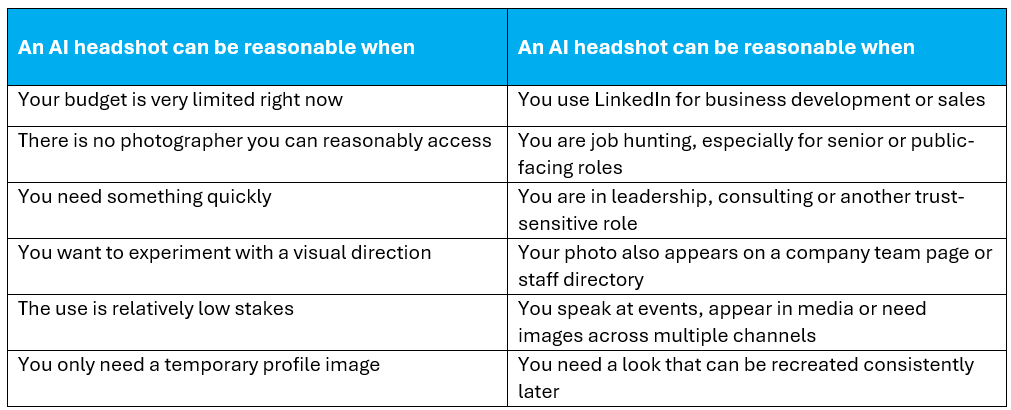
Whichever route you take, apply the recognition test before you upload the image. If a client, employer or colleague met you tomorrow, would they immediately recognise the person in the profile photo?
If you need more than a single LinkedIn profile image and want a coordinated library for your website, social channels, media and campaigns, see our personal branding photography service.
What a professional LinkedIn headshot costs in Melbourne
For Melbourne professionals who can get to a studio, or have a photographer come to the workplace, the convenience gap between AI and a real shoot may be smaller than it first appears.
At Westend Photography in Werribee City Centre, current professional headshot pricing is:
| Option | Current price |
| 1 professional headshot | $220 + GST |
| 2 professional headshots | $349 + GST |
| 5 professional headshots | $600 + GST |
| Teams of 4 to 9 people | $149 + GST per person |
| Teams of 10 to 19 people | $129 + GST per person |
| Teams of 20 to 25 people | $109 + GST per person |
| Teams of 26 or more | Price on application |
Those prices are not presented as proof that a professional session is right for everyone. They simply give Melbourne readers a real local reference point when comparing the convenience and cost of different approaches.
If you are comparing AI and professional photography, focus on what you actually need from the final image: accurate likeness, a usable crop, consistency, long-term reuse and whether the result supports the professional impression you want to create.
Common mistakes, whichever route you choose
- Using a photo that is years out of date. This is a common problem and has nothing to do with AI.
- Choosing the most flattering AI result instead of the most accurate one.
- Over-retouching. Photographers can overdo this too. Smoothing skin until it looks artificial creates the same kind of mismatch.
- Using mismatched headshots across a company team page.
- Uploading employee photos to an AI service without checking its privacy and data-retention terms.
- Cropping too wide, so the face becomes tiny in LinkedIn’s circular profile image.
- Using a polished image that does not match how you actually present yourself in professional settings.
Checklist before you upload your LinkedIn headshot
- Would someone meeting you in person recognise you immediately?
- Is your face clearly visible and filling enough of the frame?
- Does the image still work when reduced to a small circular crop?
- Are there any odd details such as distorted glasses, teeth, jewellery, hair or clothing?
- Does the expression and clothing suit the people you want to reach?
- Does the image match, or at least feel consistent with, your website and company profile?
- If it is AI-generated, have you checked the service’s data-retention, training and usage terms?
- Would you still feel comfortable using this exact image if a client or employer saw you in person the next day?
The bottom line
AI headshots are now good enough that dismissing them outright does not make sense. They can be quick, relatively inexpensive and visually convincing.
The better question is whether the result still represents you accurately enough for the job your LinkedIn profile needs to do.
If LinkedIn is mainly an online directory for you, a good AI result may be enough.
If people use your profile to decide whether to hire you, trust you, invite you to speak or do business with you, likeness, consistency and repeatability matter more. That is where we would still choose a professionally photographed headshot.
If you are in Melbourne’s west and want to compare that option, you can view Westend Photography’s professional headshot packages or book a session at the Werribee studio
Frequently asked questions
Is it allowed to use an AI headshot on LinkedIn?
LinkedIn says a profile photo must reflect your likeness and allows artistic renderings of yourself. Its published profile-photo guidance does not specifically address AI headshots. An AI-generated image that accurately reflects your likeness appears consistent with the wording, but LinkedIn does not explicitly confirm that interpretation.
Can people tell if a headshot is AI-generated?
Not reliably in every case. A July 2026 study found average accuracy of 58.4% when participants tried to distinguish real faces from AI-synthesised faces. That research tested synthetic people rather than AI versions of known individuals, so someone who knows you may still notice likeness errors that a stranger would miss.
How much does a professional headshot cost in Melbourne?
Prices vary between photographers. At Westend Photography in Werribee, a single professional headshot is currently $220 + GST, with lower per-person pricing available for team sessions.
Are AI headshot apps safe for my privacy?
It depends on the service. Check how uploaded images are stored, retained, deleted and used, including whether they may be used for training. Australian organisations should also consider OAIC guidance when employee or customer images are being handled through AI products.
How often should I update my LinkedIn headshot?
Update it when your current image no longer represents how you look or how you present professionally. A significant change in hairstyle, glasses, facial hair or professional role can all be reasonable triggers.
Should my LinkedIn photo match my company website photo?
Ideally, it should be the same image or clearly consistent with it. That makes it easier for people to connect your LinkedIn profile, website, speaker bio and company page to the same person.